
Bangbet Tanzania app – Android APK download and iOS setup
The Bangbet Tanzania mobile app runs on Android 6.0 and above, weighs 62 MB and loads roughly 40% faster than the mobile site on a typical Vodacom 4G connection in Dar es Salaam. You get sports betting, Aviator, live casino and instant TZS withdrawals — all without needing a Google Play account to install it.


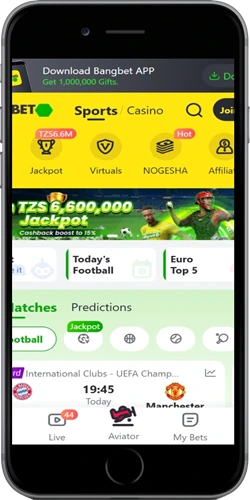
What the app does better than the browser version
Players in Mwanza and Arusha who switched from the mobile site to the APK consistently report faster bet placement — the app skips the browser rendering layer entirely, so tapping a live odds market and getting the bet slip open takes under 1 second on most mid-range Tanzanian phones. That matters when you are live betting a Simba SC match and the odds shift every 15 seconds.
Data usage is also noticeably lower. A typical 30-minute session of browsing football markets, placing two bets and checking the casino lobby uses around 8–11 MB in the app versus 18–24 MB in Chrome on the same connection. For players on Airtel or Tigo prepaid bundles in Tanzania, that adds up over a month.
How to download and install the Android APK
The APK is served directly from the official Bangbet Tanzania domain — no third-party mirror sites, no Play Store account needed. The file is 62 MB and installs cleanly on the phones most common in Tanzania: Tecno Spark 10 Pro, Infinix Hot 30 and Samsung Galaxy A14 all work without issues. The only step that might be unfamiliar is enabling installs from outside the Play Store, and that takes about 20 seconds.
One thing worth knowing before you start: Tecno phones running HiOS and Infinix phones running XOS sometimes show a "blocked by Phone Manager" warning instead of the standard Android security prompt. If that happens, open Phone Manager, go to Privacy, and disable App Install Protection — then come back and tap the APK again. It is the same permission, just labelled differently by those manufacturers.
- Enable unknown sources — on Android 8.0 and above go to Settings → Apps → Special Access → Install Unknown Apps, then grant permission to your browser. On Android 7 and below it is Settings → Security → Unknown Sources.
- Download the APK — tap the Download Android APK button at the top of this page. The file (bangbet-tz.apk, 62 MB) goes straight to your Downloads folder.
- Open the file — pull down your notification bar and tap the completed download, or open your Files app and go to Downloads.
- Tap Install — the process takes 15 to 30 seconds. The app does not ask for root access or unusual device permissions.
- Log in or register — find the Bangbet icon in your app drawer, open it and log in with your existing account. New players can register inside the app in under 3 minutes.
Using Bangbet Tanzania on iPhone and iPad
There is no native iOS app on the App Store right now. The Bangbet Tanzania mobile website in Safari on iPhone gives you full access to sports betting, Aviator, slots, live casino and TZS payments — it works on iOS 13.0 and above, meaning every iPhone from the XR onwards. Well, technically the XR came with iOS 12 but updates to 16, so it qualifies.
For something that feels more like an installed app: open bangbettanzania.com in Safari, tap the Share icon (the square with an arrow), and select "Add to Home Screen." The shortcut opens full-screen, no browser bar visible. It works on iPad too. The experience is not identical to the Android APK — no push notifications, no offline navigation — but the betting and casino features are the same.
Android APK
- 62 MB native install, no Play Store
- Android 6.0 and above
- Push notifications for odds and bonuses
- Offline bet history and basic navigation
- One-tap M-Pesa, Tigo Pesa, HaloPesa
- Tested on Tecno Spark, Infinix Hot, Samsung A-series
iOS mobile web
- No download — open in Safari
- iOS 13.0 and above (iPhone XR onwards)
- Add to Home Screen for full-screen mode
- Full sports, casino and payment access
- No push notifications
- Same TZS deposit minimum: TZS 1,000
Device compatibility and system requirements
The APK is tuned for mid-range Android hardware that dominates the Tanzanian market. Tecno Camon 20, Infinix Hot 30 and Samsung Galaxy A14 all run the app at full speed with no frame drops on the Aviator game or live dealer streams. Lower-spec devices like the Tecno POP 7 (1 GB RAM, Android 11 Go) can install and run the app but may see slower load times on the live casino section — the sportsbook and crash games work fine.
Android requirements
- OS: Android 6.0 (Marshmallow) minimum
- RAM: 1 GB minimum, 2 GB for live casino
- Storage: 80 MB free space
- Network: 3G for sports and slots, 4G for live dealers
- Screen: 4.5 inch and above
iOS requirements
- OS: iOS 13.0 or later
- Browser: Safari recommended
- Device: iPhone XR, 11, 12, 13, 14, 15 series
- Network: 4G or Wi-Fi for live games
- Storage: No local install needed
Tested Tanzania devices
- Tecno Spark 10 Pro — full support
- Infinix Hot 30 — full support
- Samsung Galaxy A14 — full support
- Samsung Galaxy A05 — full support
- Xiaomi Redmi 12C — full support
Keeping the app updated and fixing common install problems
The Bangbet Tanzania app checks for updates automatically each time it opens, provided a connection is active. If a new version is available, a prompt appears inside the app — tap Update, the new APK (around 62 MB again) downloads and installs over the existing one. Your account, balance and bet history stay exactly as they were. You can also just come back to this page and download the latest APK manually at any point.
The most common install problem for players in Tanzania is a "Parse Error" message. That usually means the download was interrupted partway through — delete the partial file from Downloads and download it again on Wi-Fi or a stable 4G connection. The second most common issue is the "App not installed" error, which happens when an older version is already on the device. Uninstall the old version first, then install the new APK. Your account data is stored server-side so nothing is lost.